---
title: Custom providers
description: 'Add custom authentication providers to SuperTokens '
sidebar:
  order: 4
---

## Overview

If you can't find a provider in [the built-in list](/authentication/social/built-in-providers-config), you can add your own custom implementation as shown below.

:::info[Note]
If you think that SuperTokens should support this provider by default, make sure to let the team know [on GitHub](https://github.com/supertokens/supertokens-node/issues/88).
:::

---

## Create a custom provider

### 1. Render the authentication method in the authentication UI

<UITypeSwitch />

<VariantContent storageKey="ui-type" value="prebuilt">


<DependentContent passive group="frontend-prebuilt-ui">
<ContentOption title="Reactjs" value="reactjs">
Include the provider in the `providers` array in the frontend SDK.
</ContentOption>
<ContentOption title="Angular" value="angular">
:::warning[This is impossible for non-react apps at the moment. Please use custom UI instead for the sign in form.]
:::
</ContentOption>
<ContentOption title="Vue" value="vue">
:::warning[This is impossible for non-react apps at the moment. Please use custom UI instead for the sign in form.]
:::
</ContentOption>
</DependentContent>

<CodeGroup group="frontend-prebuilt-ui">
<Tab title="Reactjs" value="reactjs">
```tsx
import React from "react";
import SuperTokens from "supertokens-auth-react";
import ThirdParty from "supertokens-auth-react/recipe/thirdparty";
SuperTokens.init({
  appInfo: {
    apiDomain: "...",
    appName: "...",
    websiteDomain: "...",
  },
  recipeList: [
    ThirdParty.init({
      signInAndUpFeature: {
        providers: [
          {
            id: "custom",
            name: "X", // Will display "Continue with X"

            // optional
            // you do not need to add a click handler to this as
            // we add it for you automatically.
            buttonComponent: (props: { name: string }) => (
              <div
                style={{
                  cursor: "pointer",
                  border: "1",
                  paddingTop: "5px",
                  paddingBottom: "5px",
                  borderRadius: "5px",
                  borderStyle: "solid",
                }}
              >
                {"Login with " + props.name}
              </div>
            ),
          },
        ],
        // ...
      },
      // ...
    }),
    // ...
  ],
});
```
</Tab>
<Tab title="Angular" value="angular">

</Tab>
<Tab title="Vue" value="vue">

</Tab>
</CodeGroup>

</VariantContent>

<VariantContent storageKey="ui-type" value="custom">

You need to build your own UI listing the buttons for each of the social login providers you want your users to use. See [the implementation details page](/authentication/social/initial-setup#2-add-the-login-ui) for what to do after a user clicks one of the buttons.

</VariantContent>

### 2. Configure the credentials


**OAuth**

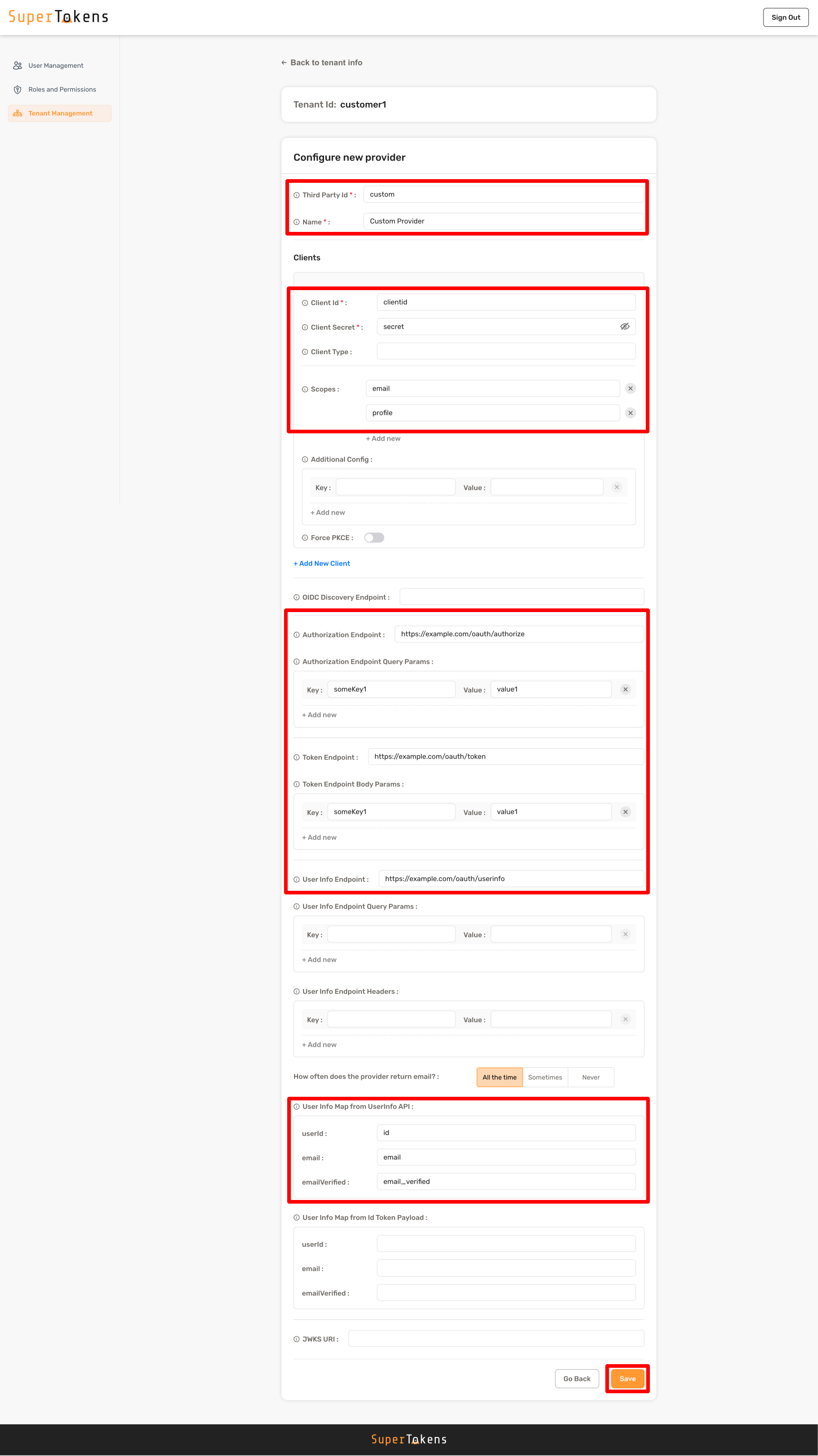
You can define a custom provider in a couple of ways. The simplest method is to provide the configuration for the `AuthorizationEndpoint`, `TokenEndpoint`, and the mapping for how the user's ID and email from the provider's profile information endpoint. This appears below:

<DependentContent passive group="backend-language">
<ContentOption title="Dashboard" value="dashboard">
Select the **public** tenant from the tenant management page and then click on **Add new provider** in the Social/Enterprise Providers section

<img src="/docs-assets/img/dashboard/tenant-management/third-party-providers.png" alt="Social/Enterprise providers"/>

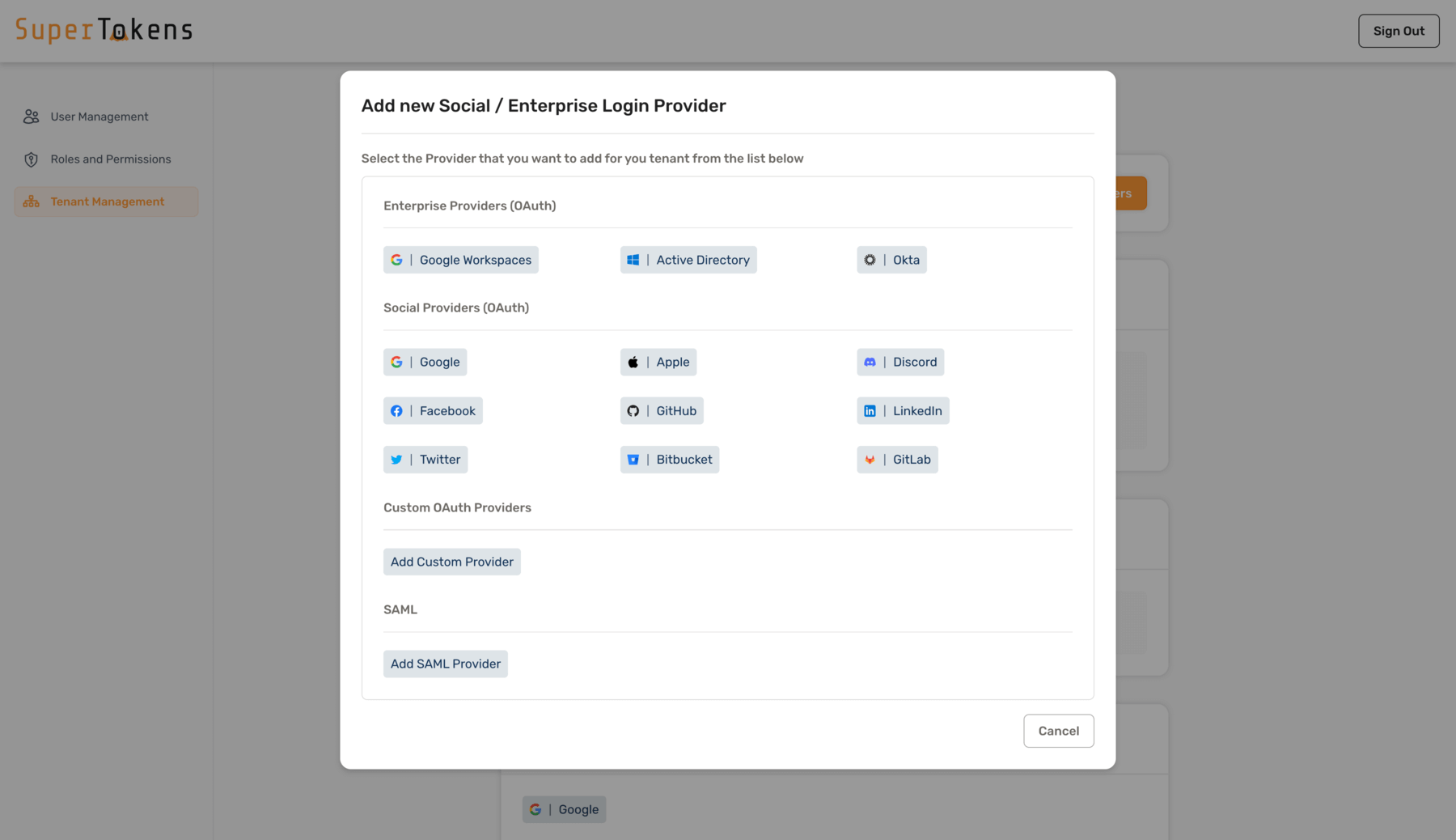
Select **Add Custom Provider** option

<img src="/docs-assets/img/dashboard/tenant-management/new-provider.png" alt="New Provider"/>

Fill in the details as shown below and click on **Save**
<img src="/docs-assets/img/dashboard/tenant-management/new-oauth-provider.png" alt="OAuth2 provider"/>
</ContentOption>
</DependentContent>

<CodeGroup group="backend-language">
<Tab title="Node.js" value="nodejs">
```tsx
import SuperTokens from "supertokens-node";
import ThirdParty from "supertokens-node/recipe/thirdparty";

SuperTokens.init({
  appInfo: {
    appName: "...",
    apiDomain: "...",
    websiteDomain: "...",
  },
  recipeList: [
    ThirdParty.init({
      signInAndUpFeature: {
        providers: [
          {
            config: {
              thirdPartyId: "custom",
              name: "Custom provider",
              clients: [
                {
                  clientId: "...",
                  clientSecret: "...",
                  scope: ["profile", "email"],
                },
              ],
              authorizationEndpoint: "https://example.com/oauth/authorize",
              authorizationEndpointQueryParams: {
                someKey1: "value1",
                someKey2: null,
              },
              tokenEndpoint: "https://example.com/oauth/token",
              tokenEndpointBodyParams: {
                someKey1: "value1",
              },
              userInfoEndpoint: "https://example.com/oauth/userinfo",
              userInfoMap: {
                fromUserInfoAPI: {
                  userId: "id",
                  email: "email",
                  emailVerified: "email_verified",
                },
              },
            },
          },
        ],
      },
    }),
  ],
});
```
</Tab>
<Tab title="Go" value="go">
```go
import (
	"github.com/supertokens/supertokens-golang/recipe/thirdparty"
	"github.com/supertokens/supertokens-golang/recipe/thirdparty/tpmodels"
	"github.com/supertokens/supertokens-golang/supertokens"
)

func main() {
	supertokens.Init(supertokens.TypeInput{
		RecipeList: []supertokens.Recipe{
			thirdparty.Init(&tpmodels.TypeInput{
				SignInAndUpFeature: tpmodels.TypeInputSignInAndUp{
					Providers: []tpmodels.ProviderInput{
						{
							Config: tpmodels.ProviderConfig{
								ThirdPartyId: "custom",
								Name:         "Custom provider",
								Clients: []tpmodels.ProviderClientConfig{
									{
										ClientID:     "...",
										ClientSecret: "...",
										Scope:        []string{"profile", "email"},
									},
								},
								AuthorizationEndpoint: "https://example.com/oauth/authorize",
								AuthorizationEndpointQueryParams: map[string]interface{}{ // optional
									"someKey1": "value1",
									"someKey2": nil,
								},
								TokenEndpoint: "https://example.com/oauth/token",
								TokenEndpointBodyParams: map[string]interface{}{ // optional
									"someKey1": "value1",
								},
								UserInfoEndpoint: "https://example.com/oauth/userinfo",
								UserInfoMap: tpmodels.TypeUserInfoMap{
									FromIdTokenPayload: struct {
										UserId        string "json:\"userId,omitempty\""
										Email         string "json:\"email,omitempty\""
										EmailVerified string "json:\"emailVerified,omitempty\""
									}{
										UserId:        "id",
										Email:         "email",
										EmailVerified: "email_verified",
									},
								},
							},
						},
					},
				},
			}),
		},
	})
}
```
</Tab>
<Tab title="Python" value="python">
```python check=false reason="This example omits surrounding application and SuperTokens configuration."
from supertokens_python import init, InputAppInfo
from supertokens_python.recipe import thirdparty
from supertokens_python.recipe.thirdparty import ProviderInput, ProviderConfig, ProviderClientConfig, SignInAndUpFeature
from supertokens_python.recipe.thirdparty.provider import UserInfoMap, UserFields

init(
    app_info=InputAppInfo(api_domain="...", app_name="...", website_domain="..."),
    framework='...',
    recipe_list=[
        thirdparty.init(

            sign_in_and_up_feature=SignInAndUpFeature(
                providers=[
                    ProviderInput(
                        config=ProviderConfig(
                            third_party_id="custom",
                            name="Custom Provider",
                            clients=[
                                ProviderClientConfig(
                                    client_id="...",
                                    client_secret="...",
                                    scope=["email", "profile"],
                                ),
                            ],
                            authorization_endpoint="https://example.com/oauth/authorize",
                            authorization_endpoint_query_params={
                                "someKey1": "value1",
                                "someKey2": None,
                            },
                            token_endpoint="https://example.com/oauth/token",
                            token_endpoint_body_params={
                                "someKey1": "value1",
                            },
                            user_info_endpoint="https://example.com/oauth/userinfo",
                            user_info_map=UserInfoMap(
                                from_id_token_payload=UserFields(
                                    user_id="id",
                                    email="email",
                                    email_verified="email_verified",
                                ),
                                from_user_info_api=UserFields(),
                            ),
                        ),
                    ),
                ]
            )
        )
    ]
)
```
</Tab>
<Tab title="cURL" value="curl">
```bash
curl --location --request PUT '<CORE_API_ENDPOINT>/public/recipe/multitenancy/config/thirdparty' \
--header 'api-key: <YOUR_API_KEY>' \
--header 'Content-Type: application/json' \
--data-raw '{
    "config": {
        "thirdPartyId": "custom",
        "name": "Custom provider",
        "clients": [{
            "clientId": "...",
            "clientSecret": "...",
            "scope": ["email", "profile"]
        }],
        "authorizationEndpoint": "https://example.com/oauth/authorize",
        "authorizationEndpointQueryParams": {
            "someKey1": "value1",
            "someKey2": "value2"
        },
        "tokenEndpoint": "https://example.com/oauth/token",
        "tokenEndpointBodyParams": {
            "someKey1": "value1"
        },
        "userInfoEndpoint": "https://example.com/oauth/userinfo",
        "userInfoMap": {
            "fromUserInfoAPI": {
                "userId": "id",
                "email": "email",
                "emailVerified": "email_verified"
            }
        }
    }
}'
```
</Tab>
<Tab title="Dashboard" value="dashboard">

</Tab>
</CodeGroup>

| Configuration Field | Description | Example |
|---|---|---|
| `thirdPartyId` | Unique identifier for the provider | For Google: `"google"` |
| `name` | Display name used on the frontend login button | Setting `"XYZ"` shows "Login using XYZ" |
| `clients` | Array of client credentials for frontend clients | Multiple entries needed for web/mobile apps with different credentials. Include `clientType` if using multiple clients |
| `AuthorizationEndpoint` | URL for user login | Google: `"https://accounts.google.com/o/oauth2/v2/auth"` |
| `AuthorizationEndpointQueryParams` | Optional configuration to modify query parameters | Can add, modify, or remove (using null) query params |
| `TokenEndpoint` | API endpoint for exchanging Authorization Code | Google: `"https://oauth2.googleapis.com/token"` |
| `TokenEndpointBodyParams` | Optional configuration to modify request body | Can add, modify, or remove (using null) body params |
| `UserInfoEndpoint` | API endpoint for getting user information | Google: `"https://www.googleapis.com/oauth2/v1/userinfo"` |
| `UserInfoMap.FromUserInfoAPI` | Maps provider's JSON response fields to user info | Example mapping:<br />`userId: "id"`<br />`email: "email"`<br />`emailVerified: "email_verified"`<br />For nested values use: `userId: "user.id"` |

**OIDC**

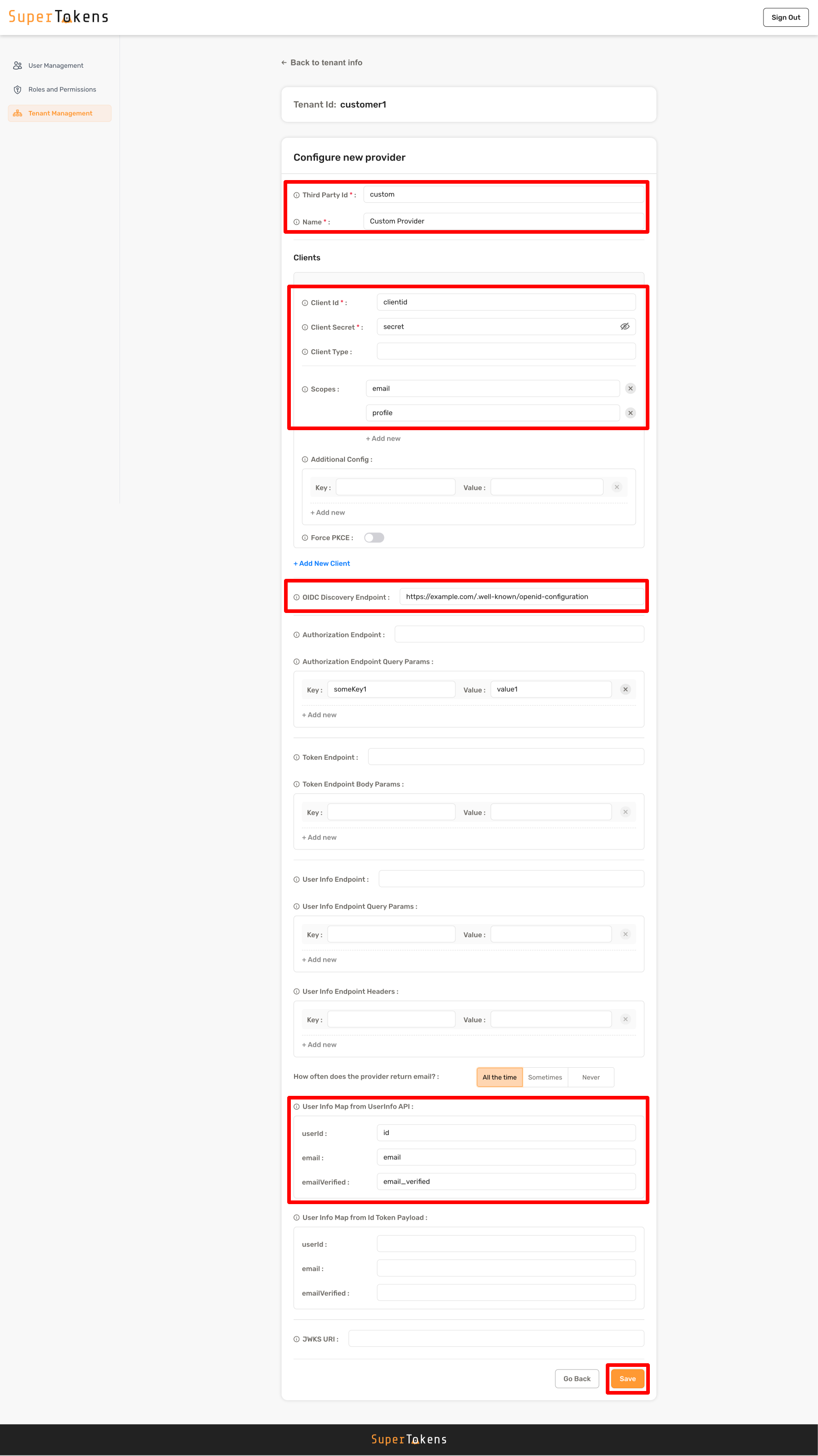
If the provider is Open ID Connect (OIDC) compatible, you can provide URL for the `OIDCDiscoverEndpoint` configuration. The backend SDK automatically discovers authorization endpoint, token endpoint and the user info endpoint by querying the `<OIDCDiscoverEndpoint>/.well-known/openid-configuration`.

Below is an example of how to set the OIDC discovery endpoint:

<DependentContent passive group="backend-language">
<ContentOption title="Dashboard" value="dashboard">
Select the **public** tenant from the tenant management page and then click on **Add new provider** in the Social/Enterprise Providers section

<img src="/docs-assets/img/dashboard/tenant-management/third-party-providers.png" alt="Social/Enterprise providers"/>

Select **Add Custom Provider** option

<img src="/docs-assets/img/dashboard/tenant-management/new-provider.png" alt="New Provider"/>

Fill in the details as shown below and click on **Save**
<img src="/docs-assets/img/dashboard/tenant-management/new-oidc-provider.png" alt="OAuth2 provider"/>
</ContentOption>
</DependentContent>

<CodeGroup group="backend-language">
<Tab title="Node.js" value="nodejs">
```tsx
import SuperTokens from "supertokens-node";
import ThirdParty from "supertokens-node/recipe/thirdparty";

SuperTokens.init({
  appInfo: {
    appName: "...",
    apiDomain: "...",
    websiteDomain: "...",
  },
  recipeList: [
    ThirdParty.init({
      signInAndUpFeature: {
        providers: [
          {
            config: {
              thirdPartyId: "custom",
              name: "Custom provider",
              clients: [
                {
                  clientId: "...",
                  clientSecret: "...",
                  scope: ["profile", "email"],
                },
              ],
              oidcDiscoveryEndpoint: "https://example.com/.well-known/openid-configuration",
              authorizationEndpointQueryParams: {
                someKey1: "value1",
                someKey2: null,
              },
              userInfoMap: {
                fromIdTokenPayload: {
                  userId: "id",
                  email: "email",
                  emailVerified: "email_verified",
                },
              },
            },
          },
        ],
      },
    }),
  ],
});
```
</Tab>
<Tab title="Go" value="go">
```go
import (
	"github.com/supertokens/supertokens-golang/recipe/thirdparty"
	"github.com/supertokens/supertokens-golang/recipe/thirdparty/tpmodels"
	"github.com/supertokens/supertokens-golang/supertokens"
)

func main() {
	supertokens.Init(supertokens.TypeInput{
		RecipeList: []supertokens.Recipe{
			thirdparty.Init(&tpmodels.TypeInput{
				SignInAndUpFeature: tpmodels.TypeInputSignInAndUp{
					Providers: []tpmodels.ProviderInput{
						{
							Config: tpmodels.ProviderConfig{
								ThirdPartyId: "custom",
								Name:         "Custom provider",
								Clients: []tpmodels.ProviderClientConfig{
									{
										ClientID:     "...",
										ClientSecret: "...",
										Scope:        []string{"profile", "email"},
									},
								},
								OIDCDiscoveryEndpoint: "https://example.com/.well-known/openid-configuration",
								AuthorizationEndpointQueryParams: map[string]interface{}{ // optional
									"someKey1": "value1",
									"someKey2": nil,
								},
								UserInfoMap: tpmodels.TypeUserInfoMap{
									FromIdTokenPayload: struct {
										UserId        string "json:\"userId,omitempty\""
										Email         string "json:\"email,omitempty\""
										EmailVerified string "json:\"emailVerified,omitempty\""
									}{
										UserId:        "id",
										Email:         "email",
										EmailVerified: "email_verified",
									},
								},
							},
						},
					},
				},
			}),
		},
	})
}
```
</Tab>
<Tab title="Python" value="python">
```python check=false reason="This example omits surrounding application and SuperTokens configuration."
from supertokens_python import init, InputAppInfo
from supertokens_python.recipe import thirdparty
from supertokens_python.recipe.thirdparty import ProviderInput, ProviderConfig, ProviderClientConfig, SignInAndUpFeature
from supertokens_python.recipe.thirdparty.provider import UserInfoMap, UserFields

init(
    app_info=InputAppInfo(api_domain="...", app_name="...", website_domain="..."),
    framework='...',
    recipe_list=[
        thirdparty.init(

            sign_in_and_up_feature=SignInAndUpFeature(
                providers=[
                    ProviderInput(
                        config=ProviderConfig(
                            third_party_id="custom",
                            name="Custom Provider",
                            clients=[
                                ProviderClientConfig(
                                    client_id="...",
                                    client_secret="...",
                                    scope=["email", "profile"],
                                ),
                            ],
                            oidc_discovery_endpoint="https://example.com/.well-known/openid-configuration",
                            authorization_endpoint_query_params={
                                "someKey1": "value1",
                                "someKey2": None,
                            },
                            user_info_map=UserInfoMap(
                                from_user_info_api=UserFields(
                                    user_id="id",
                                    email="email",
                                    email_verified="email_verified",
                                ),
                                from_id_token_payload=UserFields(),
                            ),
                        ),
                    ),
                ]
            )
        )
    ]
)
```
</Tab>
<Tab title="cURL" value="curl">
```bash
curl --location --request PUT '<CORE_API_ENDPOINT>/public/recipe/multitenancy/config/thirdparty' \
--header 'api-key: <YOUR_API_KEY>' \
--header 'Content-Type: application/json' \
--data-raw '{
    "config": {
        "thirdPartyId": "custom",
        "name": "Custom provider",
        "clients": [{
            "clientId": "...",
            "clientSecret": "...",
            "scope": ["email", "profile"]
        }],
        "oidcDiscoveryEndpoint": "https://example.com/.well-known/openid-configuration",
        "authorizationEndpointQueryParams": {
            "someKey1": "value1",
            "someKey2": "value2"
        },
        "userInfoMap": {
            "fromIdTokenPayload": {
                "userId": "id",
                "email": "email",
                "emailVerified": "email_verified"
            }
        }
    }
}'
```
</Tab>
<Tab title="Dashboard" value="dashboard">

</Tab>
</CodeGroup>

- The configuration values are similar to the ones in the "Via OAuth endpoints" method. Please read that section to understand the `thirdPartyId`, `name`, `clients` configuration.
- Unlike the "Via OAuth endpoints", you can obtain the user's info from the ID token payload using the configuration specified by you in the `UserInfoMap.FromIdTokenPayload` map.
- You can also add the `UserInfoMap.FromUserInfoAPI` map as done in the "Via OAuth endpoints" section. SuperTokens auto merges the user information.

---

## Handle non standard providers.

Sometimes, one of the steps in the providers interaction may not be per a standard. Therefore, providing the configuration like shown above may not work. To handle this case, you can override any of the steps that happen during the OAuth exchange.

For example, the API call made to get the user's profile info makes a `GET` call to the `UserInfoEndpoint` with the user's access token. If your provider requires a different method or requires multiple calls to different endpoints to get the profile info, then you can override the default implementation as shown below:

<CodeGroup group="backend-language">
<Tab title="Node.js" value="nodejs">
```tsx
import SuperTokens from "supertokens-node";
import ThirdParty from "supertokens-node/recipe/thirdparty";

SuperTokens.init({
  appInfo: {
    appName: "...",
    apiDomain: "...",
    websiteDomain: "...",
  },
  recipeList: [
    ThirdParty.init({
      signInAndUpFeature: {
        providers: [
          {
            config: {
              thirdPartyId: "custom",
              name: "Custom provider",
              clients: [
                {
                  clientId: "...",
                  clientSecret: "...",
                  scope: ["profile", "email"],
                },
              ],
              authorizationEndpoint: "https://example.com/oauth/authorize",
              authorizationEndpointQueryParams: {
                response_type: "token", // Changing an existing parameter
                response_mode: "form", // Adding a new parameter
                scope: null, // Removing a parameter
              },
              tokenEndpoint: "https://example.com/oauth/token",
            },
            override: (originalImplementation) => {
              return {
                ...originalImplementation,
                getUserInfo: async function (input: Parameters<typeof originalImplementation.getUserInfo>[0]) {
                  // Call provider's APIs to get profile info
                  // ...
                  return {
                    thirdPartyUserId: "...",
                    email: {
                      id: "...",
                      isVerified: true,
                    },
                    rawUserInfoFromProvider: {
                      fromUserInfoAPI: {
                        first_name: "...",
                        last_name: "...",
                      },
                    },
                  };
                },
              };
            },
          },
        ],
      },
    }),
  ],
});
```
</Tab>
<Tab title="Go" value="go">
```go
import (
	"github.com/supertokens/supertokens-golang/recipe/thirdparty"
	"github.com/supertokens/supertokens-golang/recipe/thirdparty/tpmodels"
	"github.com/supertokens/supertokens-golang/supertokens"
)

func main() {
	supertokens.Init(supertokens.TypeInput{
		RecipeList: []supertokens.Recipe{
			thirdparty.Init(&tpmodels.TypeInput{
				SignInAndUpFeature: tpmodels.TypeInputSignInAndUp{
					Providers: []tpmodels.ProviderInput{
						{
							Config: tpmodels.ProviderConfig{
								ThirdPartyId: "custom",
								Clients: []tpmodels.ProviderClientConfig{
									{
										ClientID:     "...",
										ClientSecret: "...",
										Scope:        []string{"profile", "email"},
									},
								},
								AuthorizationEndpoint: "https://example.com/oauth/authorize",
								AuthorizationEndpointQueryParams: map[string]interface{}{
									"response_type": "token", // Changing an existing parameter
									"response_mode": "form",  // Adding a new parameter
									"scope":         nil,     // Removing a parameter
								},
								TokenEndpoint: "https://example.com/oauth/token",
							},
							Override: func(originalImplementation *tpmodels.TypeProvider) *tpmodels.TypeProvider {
								// ...
								originalImplementation.GetUserInfo = func(oAuthTokens map[string]interface{}, userContext *map[string]interface{}) (tpmodels.TypeUserInfo, error) {
									// Call provider's APIs to get profile info
									// ...
									return tpmodels.TypeUserInfo{
										ThirdPartyUserId: "...",
										Email: &tpmodels.EmailStruct{
											ID:         "...",
											IsVerified: true,
										},
										RawUserInfoFromProvider: tpmodels.TypeRawUserInfoFromProvider{
											FromUserInfoAPI: map[string]interface{}{
												"first_name": "...",
												"last_name":  "...",
												// ...
											},
										},
									}, nil
								}
								return originalImplementation
							},
						},
					},
				},
			}),
		},
	})
}
```
</Tab>
<Tab title="Python" value="python">
```python check=false reason="This example omits surrounding application and SuperTokens configuration."
from supertokens_python import init, InputAppInfo
from supertokens_python.recipe import thirdparty
from supertokens_python.recipe.thirdparty.provider import ProviderClientConfig, ProviderConfig, ProviderInput, Provider
from supertokens_python.recipe.thirdparty import SignInAndUpFeature
from supertokens_python.recipe.thirdparty.types import UserInfo, UserInfoEmail, RawUserInfoFromProvider
from typing import Dict, Any


def override_custom_provider(provider: Provider) -> Provider:
    async def get_user_info(oauth_tokens: Dict[str, Any], user_context: Dict[str, Any]) -> UserInfo:
        return UserInfo(
            third_party_user_id="...",
            email=UserInfoEmail(
                email="...",
                is_verified=True,
            ),
            raw_user_info_from_provider=RawUserInfoFromProvider(
                from_id_token_payload={},
                from_user_info_api={
                    "first_name": "...",
                    "last_name":  "...",
                },
            ),
        )
    provider.get_user_info = get_user_info
    return provider


init(
    app_info=InputAppInfo(api_domain="...", app_name="...", website_domain="..."),
    framework='...',
    recipe_list=[
        thirdparty.init(

            sign_in_and_up_feature=SignInAndUpFeature(
                providers=[
                    ProviderInput(
                        config=ProviderConfig(
                            third_party_id="custom",
                            clients=[
                                ProviderClientConfig(
                                    client_id="...",
                                    client_secret="...",
                                    scope=["profile", "email"],
                                ),
                            ],
                            authorization_endpoint="https://example.com/oauth/authorize",
                            authorization_endpoint_query_params={
                                "response_type": "token", # Changing an existing parameter
                                "response_mode": "form", # Adding a new parameter
                                "scope":         None, # Removing a parameter
                            },
                            token_endpoint="https://example.com/oauth/token",
                        ),
                        override=override_custom_provider
                    ),
                ]
            )
        )
    ]
)
```
</Tab>
</CodeGroup>

The original implementation has 4 functions which can be overridden:

1. `GetConfigForClientType`

    Selects the client configuration from the list of clients provided and returns the complete provider configuration. This is a good place to override configuration dynamically. For example, if `login_hint` appears in the request, you can add it to the `AuthorizationEndpointQueryParams` by overriding this function.

2. `GetAuthorisationRedirectURL`

    This function returns the full URL (along with query params) to which the user needs to navigate to log in.

3. `ExchangeAuthCodeForOAuthTokens`

    This function is responsible for exchanging one time use `Authorization Code` with the user's tokens, such as `Access Token`, `ID Token`, etc.

4. `GetUserInfo`

    This function is responsible for fetching the user information such as `UserId`, `Email` and `EmailVerified` using the tokens returned from the previous function.

---

## See also

<CardGroup cols={3}>
  <Card title="Get user info from the third party provider" href="/post-authentication/user-management/common-actions" />
  <Card title="Multi-tenancy authentication" href="/authentication/enterprise/introduction" />
  <Card title="Built-in providers" href="/authentication/social/custom-providers" />
  <Card title="Multiple clients on the same provider" href="/authentication/social/add-multiple-clients-for-the-same-provider" />
  <Card title="Invite based sign up" href="/authentication/social/custom-invite-flow" />
  <Card title="Hooks and overrides" href="/authentication/social/hooks-and-overrides" />
</CardGroup>