---
title: Reuse website login for desktop and mobile apps
description: Implement web authentication for desktop and mobile apps using OAuth 2.0.
sidebar:
order: 3
---
## Overview
This pattern is useful if you want to have the same web authentication experience for your desktop and mobile apps.
The implementation allows you to save development time but keep in mind that it does not involve a native authentication interface.
Users get directed to a separate browser page where they complete the authentication flow and then return to your application.
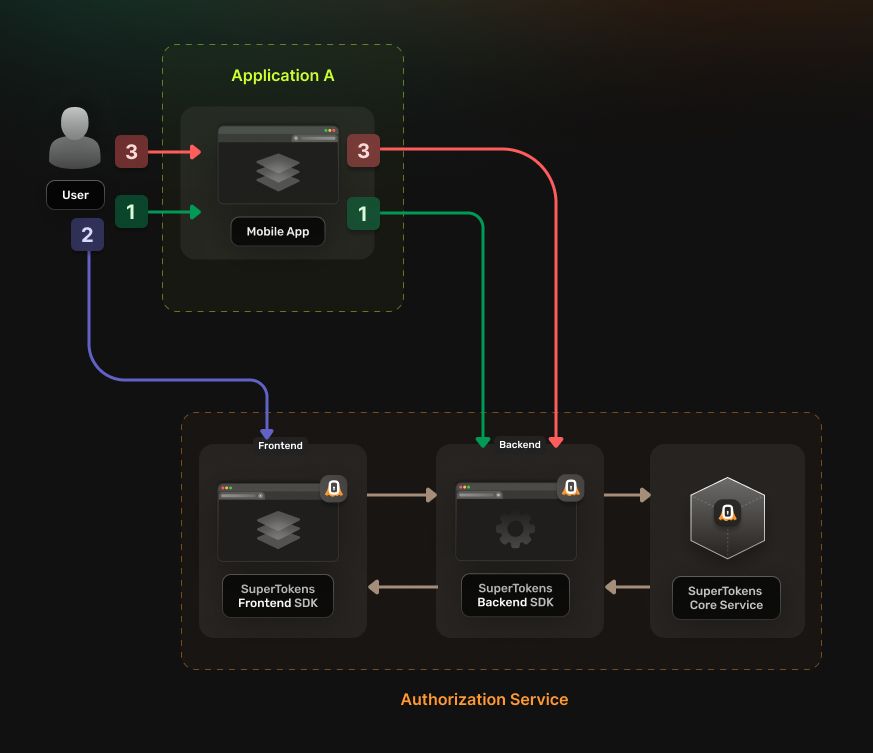
The authentication flow works in the following way:
1. **User accesses the native application**
- The user gets redirected to [**Authorization Service**](/authentication/unified-login/oauth2-basics#authorization-server) authentication URL.
- The [**Authorization Service**](/authentication/unified-login/oauth2-basics#authorization-server) redirects the user to the login UI
2. **User completes the login attempt **
- The Authorization Service redirects the user to the registered callback URL.
- Prefer an OS-claimed HTTPS universal link or app link. If you must use a custom scheme, follow the platform guidance for preventing other apps from claiming it.
3. **The application completes the authorization code flow**
- The application verifies `state`, then exchanges the code with the original PKCE verifier.
- It stores returned tokens only in platform-protected secure storage.
 ## Before you start
## Steps
### 1. Enable the Unified Login feature
Go to the [**SuperTokens.com SaaS Dashboard**](https://supertokens.com/dashboard), select the relevant **Managed** deployment, and open **Features**. Enable **Unified Login**. Changes are saved automatically.
### 2. Create the OAuth2 Clients
For each native application, create a separate [**OAuth2 client**](/authentication/unified-login/oauth2-basics#client).
Call the **SuperTokens Core** API from a trusted administrative environment. Native applications are **public clients**: `tokenEndpointAuthMethod` must be `none`, and the application must never contain or receive a client secret. Use authorization code with S256 PKCE.
**Examples**
```bash
curl --location --request POST '/recipe/oauth/clients' \
--header 'api-key: ' \
--header 'Content-Type: application/json; charset=utf-8' \
--data '
{
"clientName": "",
"responseTypes": ["code"],
"grantTypes": ["authorization_code", "refresh_token"],
"tokenEndpointAuthMethod": "none",
"scope": "offline_access ",
"redirectUris": ["https://app.example.com/oauth/callback"]
}
'
```
```tsx
const BASE_URL = "";
const API_KEY = "";
const url = `${BASE_URL}/recipe/oauth/clients`;
const options = {
method: "POST",
headers: {
"api-key": API_KEY,
"Content-Type": "application/json; charset=utf-8",
},
body: JSON.stringify({
clientName: "",
responseTypes: ["code"],
grantTypes: ["authorization_code", "refresh_token"],
tokenEndpointAuthMethod: "none",
scope: "offline_access ",
redirectUris: ["https://app.example.com/oauth/callback"],
}),
};
fetch(url, options)
.then((response) => response.json())
.then((json) => console.log(json))
.catch((err) => console.error(err));
```
```go
import (
"fmt"
"net/http"
"strings"
"io"
)
func main() {
baseUrl := ""
apiKey := ""
url := fmt.Sprintf("%s/recipe/oauth/clients", baseUrl)
payload := `{
"clientName": "",
"responseTypes": ["code"],
"grantTypes": ["authorization_code", "refresh_token"],
"tokenEndpointAuthMethod": "none",
"scope": "offline_access ",
"redirectUris": ["https://app.example.com/oauth/callback"]
}`
req, _ := http.NewRequest("POST", url, strings.NewReader(payload))
req.Header.Add("accept", "application/json")
req.Header.Add("api-key", apiKey)
req.Header.Add("content-type", "application/json")
res, _ := http.DefaultClient.Do(req)
defer res.Body.Close()
body, _ := io.ReadAll(res.Body)
fmt.Println(string(body))
}
```
```python
import requests
from typing import Dict, Any
BASE_URL = ""
API_KEY = ""
url = f"{BASE_URL}/recipe/oauth/clients"
payload: Dict[str, Any] ={
"clientName": "",
"responseTypes": ["code"],
"grantTypes": ["authorization_code", "refresh_token"],
"tokenEndpointAuthMethod": "none",
"scope": "offline_access ",
"redirectUris": ["https://app.example.com/oauth/callback"]
}
headers = {
"api-key": API_KEY,
"Content-Type": "application/json",
}
response = requests.post(url, json=payload, headers=headers)
print(response.json())
```
**Details**
Creates an OAuth2 client
**Authorization**: Set the `api-key` header to the value of your **SuperTokens** Core API key.
## Request
### Body Schema
| Name | Type | Description | Required | Default Value |
|--------------------------------------------|--------------------------|-------------------------------------------------------------------------------------------------------------------------------------------------------------------------------------------------|----------|---------------|
| `clientName` | `string` | A human-readable name of the client used for identification. | Yes | - |
| `grantTypes` | `array` of `GrantType` | The grant types that the Client uses. | Yes | - |
| `redirectUris` | `array` of `string` | Exact redirect URIs registered for the client. Wildcards are not supported. | Yes | - |
| `scope` | `string` | String containing a space-separated list of scope values (as described in Section 3.3 of OAuth 2.0 [RFC6749]) that the client can use when requesting access tokens. Include the `offline_access` scope to exchange OAuth2 Refresh Tokens for OAuth2 Access Tokens | No | "" |
| `responseTypes` | `array` of `ResponseType` | The types of responses your client expects from the **Authorization Server** | No | - |
| `tokenEndpointAuthMethod` | `enum`(`"client_secret_basic"`, `"client_secret_post"`, `"private_key_jwt"`, `"none"`) | The requested client authentication method | No | `client_secret_basic` |
| `authorizationCodeGrantAccessTokenLifespan` | `Time Duration` | OAuth2 Access Token lifespan when using the Authorization Code grant flow. | No | `"1h"` |
| `authorizationCodeGrantIdTokenLifespan` | `Time Duration` | OAuth2 ID Token lifespan when using the Authorization Code grant flow. | No | `"1h"` |
| `authorizationCodeGrantRefreshTokenLifespan`| `Time Duration` | OAuth2 Refresh Token lifespan when using the Authorization Code grant flow. | If `refreshTokenGrantRefreshTokenLifespan` is also set | `"30d"` |
| `refreshTokenGrantRefreshTokenLifespan` | `Time Duration` | OAuth2 Refresh Token lifespan when using the Refresh Token grant flow. Must match `authorizationCodeGrantRefreshTokenLifespan`. | If `authorizationCodeGrantRefreshTokenLifespan` is also set | `"30d"` |
| `clientCredentialsGrantAccessTokenLifespan` | `Time Duration` | OAuth2 Access Token lifespan when using the Client Credentials grant flow. | No | `"1h"` |
| `enableRefreshTokenRotation` | `boolean` | Indicates that the refresh token is a one-time use. Set it to `false` to disable refresh token rotation. | No | `true` |
#### GrantType
- `authorization_code`: allows exchanging the Authorization Code for an OAuth2 Access Token.
- `refresh_token`: allows exchanging the OAuth2 Refresh Token for an OAuth2 Access Token.
- `client_credentials`: allows the client to directly request an OAuth2 Access Token by authenticating itself with the Authorization Server using its own client credentials.
#### TokenEndpointAuthMethod
- `client_secret_basic`: uses the HTTP Basic Authentication scheme to authenticate the client.
- `client_secret_post`: uses the HTTP `POST` Authentication scheme to authenticate the client.
- `private_key_jwt`: uses JSON Web Tokens (JWT) to authenticate the client.
- `none`: indicates that the process of obtaining an OAuth2 Access Token does not use the client secret. Used for public clients (native apps or mobile apps).
#### ResponseType
- `code`: Indicates that the Client receives an Authorization Code that it exchanges for an OAuth2 Access Token.
- `id_token`: Indicates that the Client expects an ID Token.
#### Time Duration
A string value that signifies time duration in milliseconds, seconds, minutes, or hours: `"2000ms"`, `"60s"`, `"30m"`, `"1h"`.
### Example
```bash
curl -X POST /recipe/oauth/clients \
-H "Content-Type: application/json" \
-H "api-key: " \
-d '{
"clientName": "",
"responseTypes": ["code"],
"grantTypes": ["authorization_code", "refresh_token"],
"tokenEndpointAuthMethod": "none",
"scope": "offline_access ",
"redirectUris": ["https://app.example.com/oauth/callback"]
}'
```
## Response
### 200
The client has been successfully created.
### Relevant response fields
The response includes the persisted client configuration, including the fields below.
| Property | Type | Description |
|-------------|----------------------------------|-----------------------------------------------|
| `clientName` | `string` | The name of the client. |
| `clientId` | `string` | Unique identifier for the client. |
| `clientSecret` | `string` | Client secret for a confidential client. Omitted for a public client. Treat it as a credential and keep it on a trusted backend. |
| `redirectUris` | `array` of `string` | The URLs used for redirection. |
| `audience` | `array` of `string` | Value used to identify for whom a token is issued. The created client can generate access token only for the specified audiences. |
| `scope` | `string` | A space-separated string of scopes that the client can request. |
| `responseTypes` | `array` of `string` | Registered response types. |
| `grantTypes` | `array` of `string` | Registered grant types. |
| `tokenEndpointAuthMethod` | `string` | Token endpoint authentication method. |
| `enableRefreshTokenRotation` | `boolean` | Whether refresh token rotation is enabled. |
#### Example
```json
{
"clientName": "",
"clientId": "",
"tokenEndpointAuthMethod": "none",
"redirectUris": ["https://app.example.com/oauth/callback"],
"audience": [""],
"scope": "offline_access "
}
```
:::warning[Protect OAuth client credentials]
Core persists the client configuration and encrypts confidential client secrets at rest. Store any returned client secret in a secret manager and expose it only to the application backend. Public clients do not receive or use a client secret.
:::
Based on the client creation process, you can infer two additional values that you need later on:
- `authorizeUrl` corresponds to `/auth/oauth/auth`
- `tokenFetchUrl` corresponds to `/auth/oauth/token`
### 3. Configure the Authorization Service
Check one of the previous guides that show you how to set up the **Authorization Service** and then return to this page.
Choose the tutorial based on whether you use multiple backend services or not:
- [Single Backend Setup](/authentication/unified-login/quickstart-guides/multiple-frontends-with-a-single-backend#3-set-up-the-authorization-service-backend)
- [Multiple Backends Setup](/authentication/unified-login/quickstart-guides/multiple-frontends-with-separate-backends#3-set-up-your-authorization-service-backend)
### 4. Update the login flow in your applications
In each of your individual `applications`, you need to set up logic for handling the **OAuth 2.0** authentication flow.
Use a maintained native OAuth 2.0/OIDC library that uses the system browser and authorization code with S256 PKCE. For every request, let the library generate a fresh PKCE verifier and high-entropy `state`; verify `state` before code exchange. If you request `openid`, also generate and validate `nonce` and validate the ID token's signature, issuer, audience, expiry, and nonce. Never use an embedded web view.
Register an exact callback URI. Prefer an OS-claimed HTTPS universal link or app link; use a custom scheme only when the platform's interception protections are configured. Store access and refresh tokens in Keychain, Android Keystore-backed storage, or the platform equivalent. Never put tokens in logs, URLs, plain-text preferences, or application bundles.
You can use the [react-native-app-auth](https://commerce.nearform.com/open-source/react-native-app-auth/) library.
Follow [the instructions](https://commerce.nearform.com/open-source/react-native-app-auth/docs/usage/config) to set up your application.
Use authorization code with S256 PKCE and validate `state`. You can identify the configuration parameters from the response in **step 2**.
- `issuer` corresponds to the endpoint of the **Authorization Service** `/auth`
- `clientId` corresponds to `clientId`
- `redirectUrl` corresponds to a value from `redirectUris`
- `scopes` is the space-separated `scope` value split into a list
You also need to set the `additionalParameters` property with the following values:
- `max_age: 0` This forces a new authentication flow once the user ends up on the **Authorization Service** frontend.
- `tenant_id: ` Optional, in case you are using a multi tenant setup. Set this to the actual tenant ID.
You can use the [AppAuth-Android](https://github.com/openid/AppAuth-Android) library.
Follow [the instructions](https://github.com/openid/AppAuth-Android?tab=readme-ov-file#authorization-service-configuration) to set up your application.
Use authorization code with S256 PKCE and validate `state`. You can identify the configuration parameters from the response in **step 2**.
For the `AuthorizationServiceConfiguration`, the parameters you need to provide are: `authorizeUrl` and `tokenFetchUrl`.
When calling the `AuthorizationRequest.Builder` function you can use `clientId` and a value from `redirectUris` to replace the example values.
You need to set additional query parameters by calling the `setAdditionalParameters` function on the `AuthorizationRequest.Builder` object:
- `max_age: 0` This forces a new authentication flow once the user ends up on the **Authorization Service** frontend.
- `tenant_id: ` Optional, in case you are using a multi tenant setup. Set this to the actual tenant ID.
You can use the [AppAuth-iOS](https://github.com/openid/AppAuth-iOS) library.
Follow [the instructions](https://github.com/openid/AppAuth-iOS?tab=readme-ov-file#auth-flow) to set up your application.
Use authorization code with S256 PKCE and validate `state`. You can identify the configuration parameters from the response in **step 2**.
- `clientId` corresponds to `clientId`
- `redirectUrl` corresponds to a value from `redirectUris`
- `scopes` is the space-separated `scope` value split into a list
- `authorizationEndpoint` corresponds to `authorizeUrl`
- `tokenEndpoint` corresponds to `tokenFetchUrl`
You also need to set extra query parameters, when instantiating the `OIDAuthorizationRequest` object, with the following values:
- `max_age: 0` This forces a new authentication flow once the user ends up on the **Authorization Service** frontend.
- `tenant_id: ` Optional, in case you are using a multi tenant setup. Set this to the actual tenant ID.
You can use the [AppAuth](https://github.com/MaikuB/flutter_appauth) library.
Follow [the instructions](https://github.com/MaikuB/flutter_appauth/tree/master/flutter_appauth) to set up your application.
Use authorization code with S256 PKCE and validate `state`. You can identify the configuration parameters from the response in **step 2**.
- `` corresponds to `clientId`
- `` corresponds to the endpoint of the **Authorization Service** `/auth`
- `` corresponds to a value from `redirectUris`
- `scopes` is the space-separated `scope` value split into a list
You also need to set the `additionalParameters` property with the following values:
- `max_age: 0` This forces a new authentication flow once the user ends up on the **Authorization Service** frontend.
- `tenant_id: ` Optional, in case you are using a multi tenant setup. Set this to the actual tenant ID.
:::info
If you want to use the [**OAuth2 Refresh Tokens**](/authentication/unified-login/oauth2-basics#oauth2-refresh-token) make sure to include the `offline_access` scope during the initialization step.
:::
### 5. Test the new authentication flow
With everything set up, you can test your login flow.
Use the setup created in the previous step to check if the authentication flow completes without any issues.
## Before you start
## Steps
### 1. Enable the Unified Login feature
Go to the [**SuperTokens.com SaaS Dashboard**](https://supertokens.com/dashboard), select the relevant **Managed** deployment, and open **Features**. Enable **Unified Login**. Changes are saved automatically.
### 2. Create the OAuth2 Clients
For each native application, create a separate [**OAuth2 client**](/authentication/unified-login/oauth2-basics#client).
Call the **SuperTokens Core** API from a trusted administrative environment. Native applications are **public clients**: `tokenEndpointAuthMethod` must be `none`, and the application must never contain or receive a client secret. Use authorization code with S256 PKCE.
**Examples**
```bash
curl --location --request POST '/recipe/oauth/clients' \
--header 'api-key: ' \
--header 'Content-Type: application/json; charset=utf-8' \
--data '
{
"clientName": "",
"responseTypes": ["code"],
"grantTypes": ["authorization_code", "refresh_token"],
"tokenEndpointAuthMethod": "none",
"scope": "offline_access ",
"redirectUris": ["https://app.example.com/oauth/callback"]
}
'
```
```tsx
const BASE_URL = "";
const API_KEY = "";
const url = `${BASE_URL}/recipe/oauth/clients`;
const options = {
method: "POST",
headers: {
"api-key": API_KEY,
"Content-Type": "application/json; charset=utf-8",
},
body: JSON.stringify({
clientName: "",
responseTypes: ["code"],
grantTypes: ["authorization_code", "refresh_token"],
tokenEndpointAuthMethod: "none",
scope: "offline_access ",
redirectUris: ["https://app.example.com/oauth/callback"],
}),
};
fetch(url, options)
.then((response) => response.json())
.then((json) => console.log(json))
.catch((err) => console.error(err));
```
```go
import (
"fmt"
"net/http"
"strings"
"io"
)
func main() {
baseUrl := ""
apiKey := ""
url := fmt.Sprintf("%s/recipe/oauth/clients", baseUrl)
payload := `{
"clientName": "",
"responseTypes": ["code"],
"grantTypes": ["authorization_code", "refresh_token"],
"tokenEndpointAuthMethod": "none",
"scope": "offline_access ",
"redirectUris": ["https://app.example.com/oauth/callback"]
}`
req, _ := http.NewRequest("POST", url, strings.NewReader(payload))
req.Header.Add("accept", "application/json")
req.Header.Add("api-key", apiKey)
req.Header.Add("content-type", "application/json")
res, _ := http.DefaultClient.Do(req)
defer res.Body.Close()
body, _ := io.ReadAll(res.Body)
fmt.Println(string(body))
}
```
```python
import requests
from typing import Dict, Any
BASE_URL = ""
API_KEY = ""
url = f"{BASE_URL}/recipe/oauth/clients"
payload: Dict[str, Any] ={
"clientName": "",
"responseTypes": ["code"],
"grantTypes": ["authorization_code", "refresh_token"],
"tokenEndpointAuthMethod": "none",
"scope": "offline_access ",
"redirectUris": ["https://app.example.com/oauth/callback"]
}
headers = {
"api-key": API_KEY,
"Content-Type": "application/json",
}
response = requests.post(url, json=payload, headers=headers)
print(response.json())
```
**Details**
Creates an OAuth2 client
**Authorization**: Set the `api-key` header to the value of your **SuperTokens** Core API key.
## Request
### Body Schema
| Name | Type | Description | Required | Default Value |
|--------------------------------------------|--------------------------|-------------------------------------------------------------------------------------------------------------------------------------------------------------------------------------------------|----------|---------------|
| `clientName` | `string` | A human-readable name of the client used for identification. | Yes | - |
| `grantTypes` | `array` of `GrantType` | The grant types that the Client uses. | Yes | - |
| `redirectUris` | `array` of `string` | Exact redirect URIs registered for the client. Wildcards are not supported. | Yes | - |
| `scope` | `string` | String containing a space-separated list of scope values (as described in Section 3.3 of OAuth 2.0 [RFC6749]) that the client can use when requesting access tokens. Include the `offline_access` scope to exchange OAuth2 Refresh Tokens for OAuth2 Access Tokens | No | "" |
| `responseTypes` | `array` of `ResponseType` | The types of responses your client expects from the **Authorization Server** | No | - |
| `tokenEndpointAuthMethod` | `enum`(`"client_secret_basic"`, `"client_secret_post"`, `"private_key_jwt"`, `"none"`) | The requested client authentication method | No | `client_secret_basic` |
| `authorizationCodeGrantAccessTokenLifespan` | `Time Duration` | OAuth2 Access Token lifespan when using the Authorization Code grant flow. | No | `"1h"` |
| `authorizationCodeGrantIdTokenLifespan` | `Time Duration` | OAuth2 ID Token lifespan when using the Authorization Code grant flow. | No | `"1h"` |
| `authorizationCodeGrantRefreshTokenLifespan`| `Time Duration` | OAuth2 Refresh Token lifespan when using the Authorization Code grant flow. | If `refreshTokenGrantRefreshTokenLifespan` is also set | `"30d"` |
| `refreshTokenGrantRefreshTokenLifespan` | `Time Duration` | OAuth2 Refresh Token lifespan when using the Refresh Token grant flow. Must match `authorizationCodeGrantRefreshTokenLifespan`. | If `authorizationCodeGrantRefreshTokenLifespan` is also set | `"30d"` |
| `clientCredentialsGrantAccessTokenLifespan` | `Time Duration` | OAuth2 Access Token lifespan when using the Client Credentials grant flow. | No | `"1h"` |
| `enableRefreshTokenRotation` | `boolean` | Indicates that the refresh token is a one-time use. Set it to `false` to disable refresh token rotation. | No | `true` |
#### GrantType
- `authorization_code`: allows exchanging the Authorization Code for an OAuth2 Access Token.
- `refresh_token`: allows exchanging the OAuth2 Refresh Token for an OAuth2 Access Token.
- `client_credentials`: allows the client to directly request an OAuth2 Access Token by authenticating itself with the Authorization Server using its own client credentials.
#### TokenEndpointAuthMethod
- `client_secret_basic`: uses the HTTP Basic Authentication scheme to authenticate the client.
- `client_secret_post`: uses the HTTP `POST` Authentication scheme to authenticate the client.
- `private_key_jwt`: uses JSON Web Tokens (JWT) to authenticate the client.
- `none`: indicates that the process of obtaining an OAuth2 Access Token does not use the client secret. Used for public clients (native apps or mobile apps).
#### ResponseType
- `code`: Indicates that the Client receives an Authorization Code that it exchanges for an OAuth2 Access Token.
- `id_token`: Indicates that the Client expects an ID Token.
#### Time Duration
A string value that signifies time duration in milliseconds, seconds, minutes, or hours: `"2000ms"`, `"60s"`, `"30m"`, `"1h"`.
### Example
```bash
curl -X POST /recipe/oauth/clients \
-H "Content-Type: application/json" \
-H "api-key: " \
-d '{
"clientName": "",
"responseTypes": ["code"],
"grantTypes": ["authorization_code", "refresh_token"],
"tokenEndpointAuthMethod": "none",
"scope": "offline_access ",
"redirectUris": ["https://app.example.com/oauth/callback"]
}'
```
## Response
### 200
The client has been successfully created.
### Relevant response fields
The response includes the persisted client configuration, including the fields below.
| Property | Type | Description |
|-------------|----------------------------------|-----------------------------------------------|
| `clientName` | `string` | The name of the client. |
| `clientId` | `string` | Unique identifier for the client. |
| `clientSecret` | `string` | Client secret for a confidential client. Omitted for a public client. Treat it as a credential and keep it on a trusted backend. |
| `redirectUris` | `array` of `string` | The URLs used for redirection. |
| `audience` | `array` of `string` | Value used to identify for whom a token is issued. The created client can generate access token only for the specified audiences. |
| `scope` | `string` | A space-separated string of scopes that the client can request. |
| `responseTypes` | `array` of `string` | Registered response types. |
| `grantTypes` | `array` of `string` | Registered grant types. |
| `tokenEndpointAuthMethod` | `string` | Token endpoint authentication method. |
| `enableRefreshTokenRotation` | `boolean` | Whether refresh token rotation is enabled. |
#### Example
```json
{
"clientName": "",
"clientId": "",
"tokenEndpointAuthMethod": "none",
"redirectUris": ["https://app.example.com/oauth/callback"],
"audience": [""],
"scope": "offline_access "
}
```
:::warning[Protect OAuth client credentials]
Core persists the client configuration and encrypts confidential client secrets at rest. Store any returned client secret in a secret manager and expose it only to the application backend. Public clients do not receive or use a client secret.
:::
Based on the client creation process, you can infer two additional values that you need later on:
- `authorizeUrl` corresponds to `/auth/oauth/auth`
- `tokenFetchUrl` corresponds to `/auth/oauth/token`
### 3. Configure the Authorization Service
Check one of the previous guides that show you how to set up the **Authorization Service** and then return to this page.
Choose the tutorial based on whether you use multiple backend services or not:
- [Single Backend Setup](/authentication/unified-login/quickstart-guides/multiple-frontends-with-a-single-backend#3-set-up-the-authorization-service-backend)
- [Multiple Backends Setup](/authentication/unified-login/quickstart-guides/multiple-frontends-with-separate-backends#3-set-up-your-authorization-service-backend)
### 4. Update the login flow in your applications
In each of your individual `applications`, you need to set up logic for handling the **OAuth 2.0** authentication flow.
Use a maintained native OAuth 2.0/OIDC library that uses the system browser and authorization code with S256 PKCE. For every request, let the library generate a fresh PKCE verifier and high-entropy `state`; verify `state` before code exchange. If you request `openid`, also generate and validate `nonce` and validate the ID token's signature, issuer, audience, expiry, and nonce. Never use an embedded web view.
Register an exact callback URI. Prefer an OS-claimed HTTPS universal link or app link; use a custom scheme only when the platform's interception protections are configured. Store access and refresh tokens in Keychain, Android Keystore-backed storage, or the platform equivalent. Never put tokens in logs, URLs, plain-text preferences, or application bundles.
You can use the [react-native-app-auth](https://commerce.nearform.com/open-source/react-native-app-auth/) library.
Follow [the instructions](https://commerce.nearform.com/open-source/react-native-app-auth/docs/usage/config) to set up your application.
Use authorization code with S256 PKCE and validate `state`. You can identify the configuration parameters from the response in **step 2**.
- `issuer` corresponds to the endpoint of the **Authorization Service** `/auth`
- `clientId` corresponds to `clientId`
- `redirectUrl` corresponds to a value from `redirectUris`
- `scopes` is the space-separated `scope` value split into a list
You also need to set the `additionalParameters` property with the following values:
- `max_age: 0` This forces a new authentication flow once the user ends up on the **Authorization Service** frontend.
- `tenant_id: ` Optional, in case you are using a multi tenant setup. Set this to the actual tenant ID.
You can use the [AppAuth-Android](https://github.com/openid/AppAuth-Android) library.
Follow [the instructions](https://github.com/openid/AppAuth-Android?tab=readme-ov-file#authorization-service-configuration) to set up your application.
Use authorization code with S256 PKCE and validate `state`. You can identify the configuration parameters from the response in **step 2**.
For the `AuthorizationServiceConfiguration`, the parameters you need to provide are: `authorizeUrl` and `tokenFetchUrl`.
When calling the `AuthorizationRequest.Builder` function you can use `clientId` and a value from `redirectUris` to replace the example values.
You need to set additional query parameters by calling the `setAdditionalParameters` function on the `AuthorizationRequest.Builder` object:
- `max_age: 0` This forces a new authentication flow once the user ends up on the **Authorization Service** frontend.
- `tenant_id: ` Optional, in case you are using a multi tenant setup. Set this to the actual tenant ID.
You can use the [AppAuth-iOS](https://github.com/openid/AppAuth-iOS) library.
Follow [the instructions](https://github.com/openid/AppAuth-iOS?tab=readme-ov-file#auth-flow) to set up your application.
Use authorization code with S256 PKCE and validate `state`. You can identify the configuration parameters from the response in **step 2**.
- `clientId` corresponds to `clientId`
- `redirectUrl` corresponds to a value from `redirectUris`
- `scopes` is the space-separated `scope` value split into a list
- `authorizationEndpoint` corresponds to `authorizeUrl`
- `tokenEndpoint` corresponds to `tokenFetchUrl`
You also need to set extra query parameters, when instantiating the `OIDAuthorizationRequest` object, with the following values:
- `max_age: 0` This forces a new authentication flow once the user ends up on the **Authorization Service** frontend.
- `tenant_id: ` Optional, in case you are using a multi tenant setup. Set this to the actual tenant ID.
You can use the [AppAuth](https://github.com/MaikuB/flutter_appauth) library.
Follow [the instructions](https://github.com/MaikuB/flutter_appauth/tree/master/flutter_appauth) to set up your application.
Use authorization code with S256 PKCE and validate `state`. You can identify the configuration parameters from the response in **step 2**.
- `` corresponds to `clientId`
- `` corresponds to the endpoint of the **Authorization Service** `/auth`
- `` corresponds to a value from `redirectUris`
- `scopes` is the space-separated `scope` value split into a list
You also need to set the `additionalParameters` property with the following values:
- `max_age: 0` This forces a new authentication flow once the user ends up on the **Authorization Service** frontend.
- `tenant_id: ` Optional, in case you are using a multi tenant setup. Set this to the actual tenant ID.
:::info
If you want to use the [**OAuth2 Refresh Tokens**](/authentication/unified-login/oauth2-basics#oauth2-refresh-token) make sure to include the `offline_access` scope during the initialization step.
:::
### 5. Test the new authentication flow
With everything set up, you can test your login flow.
Use the setup created in the previous step to check if the authentication flow completes without any issues.