---
title: Change colours
description: Customize your authentication UI theme by defining CSS variables for color palettes.
sidebar:
order: 10
---
## Overview
You can update the default theme with your colors to make it fit with your website. Define a few CSS variables in the `style` property to the `EmailPassword.init` call.
Specify the colors as RGB (see the following example), because the `rgb` and `rgba` functions apply them.
For example, if your website uses a dark theme, here is how you can customize it:
## Before you start
:::warning
This example is relevant only if you use the prebuilt UI components.
:::
## Example
```tsx
import SuperTokens from "supertokens-auth-react";
SuperTokens.init({
appInfo: {
apiDomain: "...",
appName: "...",
websiteDomain: "...",
},
style: `
[data-supertokens~=container] {
--palette-background: 51, 51, 51;
--palette-inputBackground: 41, 41, 41;
--palette-inputBorder: 41, 41, 41;
--palette-textTitle: 255, 255, 255;
--palette-textLabel: 255, 255, 255;
--palette-textPrimary: 255, 255, 255;
--palette-error: 173, 46, 46;
--palette-textInput: 169, 169, 169;
--palette-textLink: 114,114,114;
--palette-textGray: 158, 158, 158;
}
`,
recipeList: [
/* ... */
],
});
```
```tsx check=false reason="pre-built UI globals are provided by the host framework"
// this goes in the auth route config of your frontend app (once the pre-built UI script has been loaded)
supertokensUIInit({
appInfo: {
apiDomain: "...",
appName: "...",
websiteDomain: "...",
},
style: `
[data-supertokens~=container] {
--palette-background: 51, 51, 51;
--palette-inputBackground: 41, 41, 41;
--palette-inputBorder: 41, 41, 41;
--palette-textTitle: 255, 255, 255;
--palette-textLabel: 255, 255, 255;
--palette-textPrimary: 255, 255, 255;
--palette-error: 173, 46, 46;
--palette-textInput: 169, 169, 169;
--palette-textLink: 114,114,114;
--palette-textGray: 158, 158, 158;
}
`,
recipeList: [
/* ... */
],
});
```
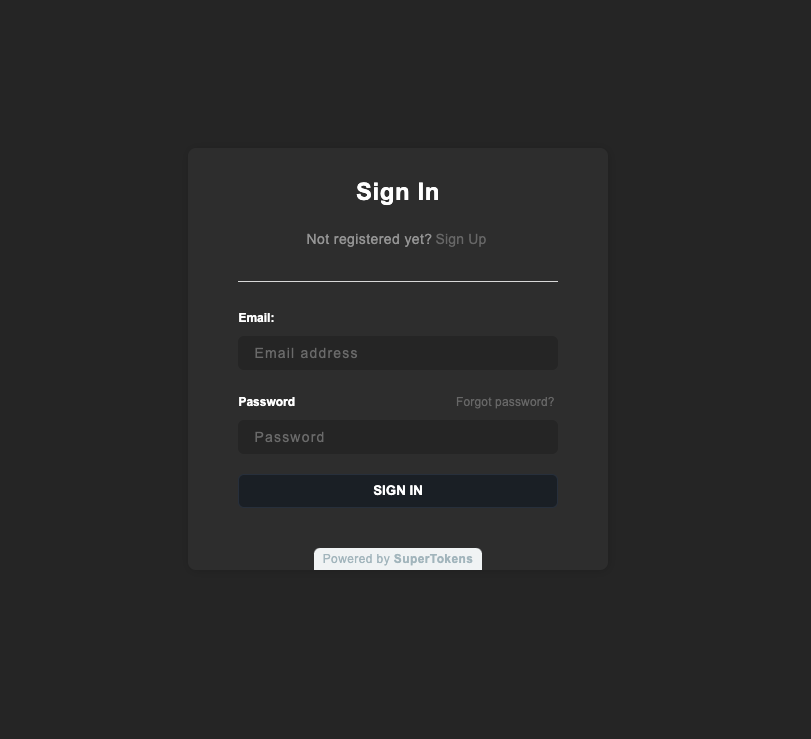 :::note
Changes to the palette apply to all the UI components provided. If you want to change a specific component, please see [this section](changing-style).
:::
### Palette values
| Variable Name | Description | Default Value |
|--------------|-------------|---------------|
| `background` | Background color of all forms | `255, 255, 255` (white) |
| `inputBackground` | Background color of input fields | `250, 250, 250` (light grey) |
| `inputBorder` | Border color of input fields | `224, 224, 224` (light grey) |
| `primary` | Primary color for focused inputs, success states and button backgrounds | `28, 34, 42` |
| `primaryBorder` | Border color for primary buttons | `45, 54, 68` |
| `success` | Color used for success events | `65, 167, 0` (green) |
| `successBackground` | Background color for success notifications | `217, 255, 191` (green) |
| `error` | Color for error highlights and messages | `255, 23, 23` (red) |
| `errorBackground` | Background color for error notifications | `255, 241, 235` (red) |
| `textTitle` | Color of form titles | `0, 0, 0` (black) |
| `textLabel` | Color of form field labels | `0, 0, 0` (black) |
| `textInput` | Color of text in form fields | `0, 0, 0` (black) |
| `textPrimary` | Color of subtitles and footer text | `128, 128, 128` (grey) |
| `textLink` | Color of links | `0, 122, 255` (blue) |
| `buttonText` | Color of text in main buttons | `255, 255, 255` (white) |
| `superTokensBrandingBackground` | Color of SuperTokens branding element | `242, 245, 246` (Alice blue) |
| `superTokensBrandingText` | Color of "Powered by SuperTokens" text | `173, 189, 196` (heather grey) |
:::note
Changes to the palette apply to all the UI components provided. If you want to change a specific component, please see [this section](changing-style).
:::
### Palette values
| Variable Name | Description | Default Value |
|--------------|-------------|---------------|
| `background` | Background color of all forms | `255, 255, 255` (white) |
| `inputBackground` | Background color of input fields | `250, 250, 250` (light grey) |
| `inputBorder` | Border color of input fields | `224, 224, 224` (light grey) |
| `primary` | Primary color for focused inputs, success states and button backgrounds | `28, 34, 42` |
| `primaryBorder` | Border color for primary buttons | `45, 54, 68` |
| `success` | Color used for success events | `65, 167, 0` (green) |
| `successBackground` | Background color for success notifications | `217, 255, 191` (green) |
| `error` | Color for error highlights and messages | `255, 23, 23` (red) |
| `errorBackground` | Background color for error notifications | `255, 241, 235` (red) |
| `textTitle` | Color of form titles | `0, 0, 0` (black) |
| `textLabel` | Color of form field labels | `0, 0, 0` (black) |
| `textInput` | Color of text in form fields | `0, 0, 0` (black) |
| `textPrimary` | Color of subtitles and footer text | `128, 128, 128` (grey) |
| `textLink` | Color of links | `0, 122, 255` (blue) |
| `buttonText` | Color of text in main buttons | `255, 255, 255` (white) |
| `superTokensBrandingBackground` | Color of SuperTokens branding element | `242, 245, 246` (Alice blue) |
| `superTokensBrandingText` | Color of "Powered by SuperTokens" text | `173, 189, 196` (heather grey) |